> ## Documentation Index
> Fetch the complete documentation index at: https://mcp.gjxx.dev/llms.txt
> Use this file to discover all available pages before exploring further.
# Java SDK Overview
> Introduction to the Model Context Protocol (MCP) Java SDK
## SDK Contents
\[[Java MCP Overview](/sdk/java/mcp-overview)]
[Java MCP Client](/sdk/java/mcp-client)
[Java MCP Server](/sdk/java/mcp-server)
The Java SDK for the [Model Context Protocol](https://modelcontextprotocol.org/docs/concepts/architecture) enables standardized integration between AI models and tools.
## Features
* MCP Client and MCP Server implementations supporting:
* Protocol [version compatibility negotiation](/specification/2025-06-18/basic/lifecycle#initialization)
* [Tool](/specification/2025-06-18/server/tools/) discovery, execution, list change notifications
* [Resource](/specification/2025-06-18/server/resources/) management with URI templates
* [Prompt](/specification/2025-06-18/server/prompts/) handling and management
* [Completion](/specification/2025-06-18/server/utilities/completion/) argument autocompletion suggestions for prompts and resource URIs
* [Progress](/specification/2025-06-18/basic/utilities/progress/) progress tracking for long-running operations
* [Ping](/specification/2025-06-18/basic/utilities/ping/) lightweight health check mechanism
* [Server Keepalive](/specification/2025-06-18/basic/utilities/ping#implementation-considerations/) to maintain active server connections
* [Logging](/specification/2025-06-18/server/utilities/logging/) for sending structured log messages to clients
* [Roots](/specification/2025-06-18/client/roots/) list management and notifications
* [Sampling](/specification/2025-06-18/client/sampling/) support for AI model interactions
* [Elicitation](/specification/2025-06-18/client/elicitation/) for servers to request additional information from users through the client
* Multiple transport implementations:
* Default transports (included in core `mcp` module, no external web frameworks required):
* Stdio-based transport for process-based communication
* Java HttpClient-based `SSE` and `Streamable-HTTP` client transport
* Servlet-based `SSE` and `Streamable-HTTP` server transport
* Optional Spring-based transports (convenience if using Spring Framework):
* WebFlux `SSE` and `Streamable-HTTP` client and server transports
* WebMVC `SSE` and `Streamable-HTTP` transport for servlet-based HTTP streaming
* Supports Synchronous and Asynchronous programming paradigms
The core `io.modelcontextprotocol.sdk:mcp` module provides default `STDIO`, `SSE` and `Streamable-HTTP` client and server transport implementations without requiring external web frameworks.
Spring-specific transports are available as optional dependencies for convenience when using the [Spring AI](https://docs.spring.io/spring-ai/reference/1.1-SNAPSHOT/api/mcp/mcp-overview.html) Framework.
## Architecture
The SDK follows a layered architecture with clear separation of concerns:
* **Client/Server Layer (McpClient/McpServer)**: Both use McpSession for sync/async operations,
with McpClient handling client-side protocol operations and McpServer managing server-side protocol operations.
* **Session Layer (McpSession)**: Manages communication patterns and state using DefaultMcpSession implementation.
* **Transport Layer (McpTransport)**: Handles JSON-RPC message serialization/deserialization via:
* StdioTransport (stdin/stdout) in the core module
* HTTP `Streamable-HTTP` and `SSE` transports in dedicated transport modules (Java HttpClient, Spring WebFlux, Spring WebMVC)
The [MCP Client](/sdk/java/mcp-client) is a key component in the Model Context Protocol (MCP) architecture, responsible for establishing and managing connections with MCP servers.
It implements the client-side of the protocol.
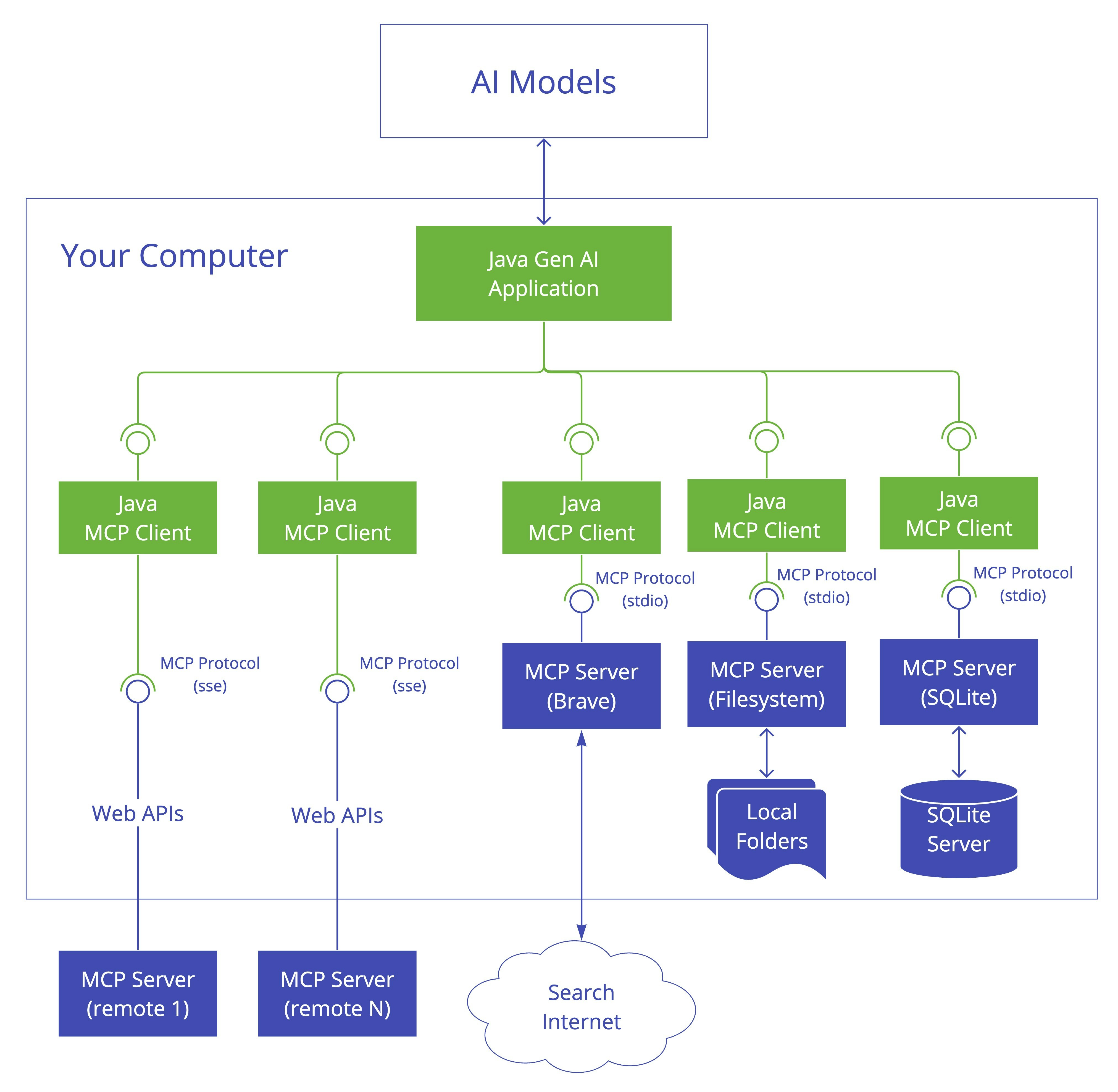 The [MCP Server](/sdk/java/mcp-server) is a foundational component in the Model Context Protocol (MCP) architecture that provides tools, resources, and capabilities to clients.
It implements the server-side of the protocol.
The [MCP Server](/sdk/java/mcp-server) is a foundational component in the Model Context Protocol (MCP) architecture that provides tools, resources, and capabilities to clients.
It implements the server-side of the protocol.
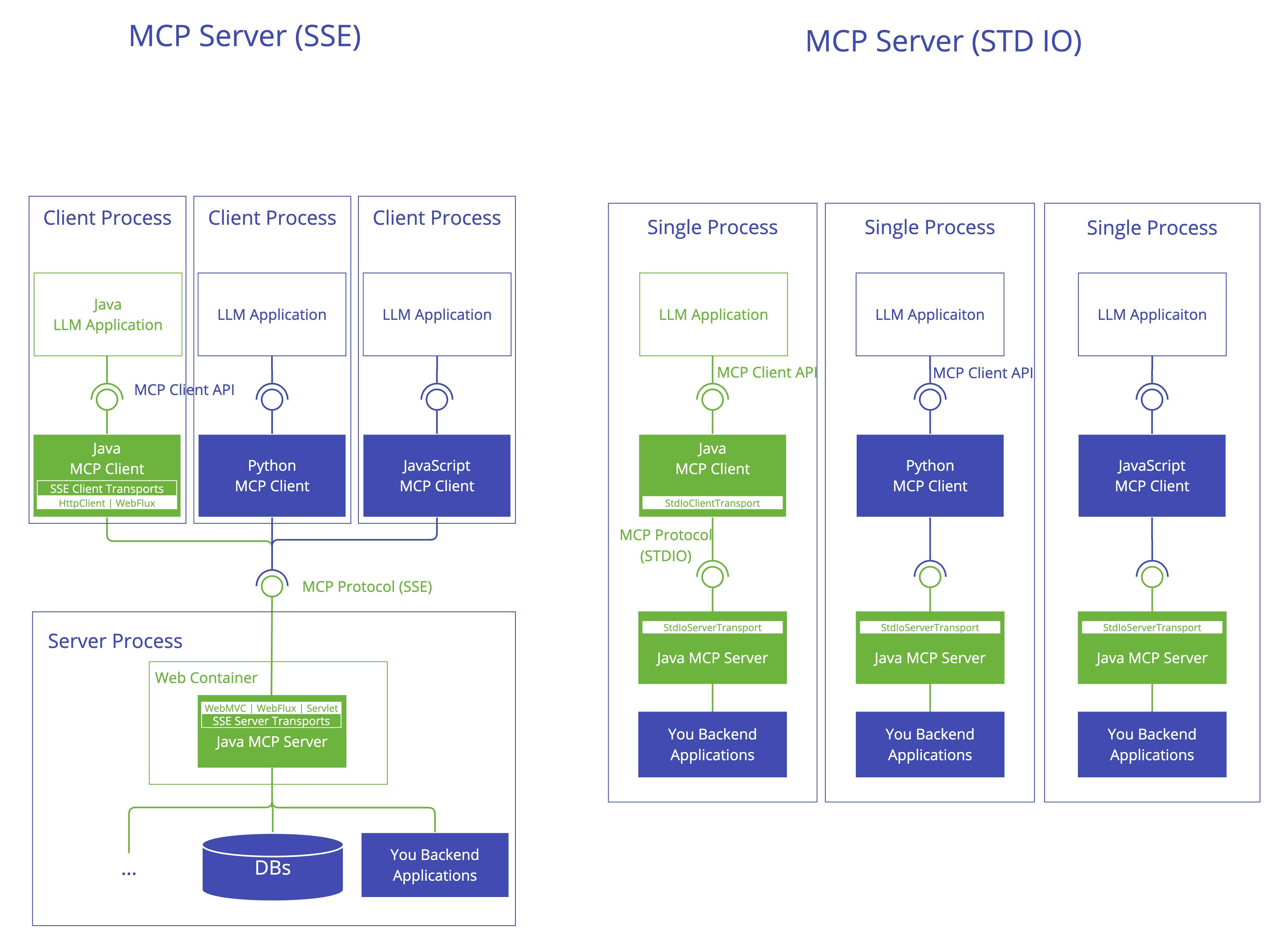 Key Interactions:
* **Client/Server Initialization**: Transport setup, protocol compatibility check, capability negotiation, and implementation details exchange.
* **Message Flow**: JSON-RPC message handling with validation, type-safe response processing, and error handling.
* **Resource Management**: Resource discovery, URI template-based access, subscription system, and content retrieval.
## Dependencies
Add the following dependencies to your project:
The core MCP functionality:
```xml theme={null}
io.modelcontextprotocol.sdk
mcp
```
The core `mcp` module already includes default `STDIO`, `SSE` and `Streamable-HTTP` transport implementations and doesn't require external web frameworks.
If you're using the Spring Framework and want to use Spring-specific transport implementations, add one of the following optional dependencies:
```xml theme={null}
io.modelcontextprotocol.sdk
mcp-spring-webflux
io.modelcontextprotocol.sdk
mcp-spring-webmvc
```
The core MCP functionality:
```groovy theme={null}
dependencies {
implementation platform("io.modelcontextprotocol.sdk:mcp")
//...
}
```
The core `mcp` module already includes default `STDIO`, `SSE` and `Streamable-HTTP` transport implementations and doesn't require external web frameworks.
If you're using the Spring Framework and want to use Spring-specific transport implementations, add one of the following optional dependencies:
```groovy theme={null}
// Optional: Spring WebFlux-based SSE and Streamable-HTTP client and server transports
dependencies {
implementation platform("io.modelcontextprotocol.sdk:mcp-spring-webflux")
}
// Optional: Spring WebMVC-based SSE and Streamable-HTTP server transports
dependencies {
implementation platform("io.modelcontextprotocol.sdk:mcp-spring-webmvc")
}
```
* `io.modelcontextprotocol.sdk:mcp-spring-webflux` - WebFlux-based Client and Server, `Streamable-HTTP` and `SSE` transport implementations.
The WebFlux implementation can be used in reactive applications while the WebClient-based MCP Client can be used in both reactive and imperative applications.
It is a highly scalable option and suitable and recommended for high-throughput scenarios.
* `io.modelcontextprotocol.sdk:mcp-spring-webmvc` - WebMVC-based Server, `Streamable-HTTP` and `SSE` transport implementation for servlet-based applications.
### Bill of Materials (BOM)
The Bill of Materials (BOM) declares the recommended versions of all the dependencies used by a given release.
Using the BOM from your application's build script avoids the need for you to specify and maintain the dependency versions yourself.
Instead, the version of the BOM you're using determines the utilized dependency versions.
It also ensures that you're using supported and tested versions of the dependencies by default, unless you choose to override them.
Add the BOM to your project:
```xml theme={null}
io.modelcontextprotocol.sdk
mcp-bom
0.12.1
pom
import
```
```groovy theme={null}
dependencies {
implementation platform("io.modelcontextprotocol.sdk:mcp-bom:0.12.1")
//...
}
```
Gradle users can also use the MCP BOM by leveraging Gradle (5.0+) native support for declaring dependency constraints using a Maven BOM.
This is implemented by adding a 'platform' dependency handler method to the dependencies section of your Gradle build script.
As shown in the snippet above, this can then be followed by version-less declarations of the MCP SDK modules you wish to use.
Replace the version number with the version of the BOM you want to use.
### Additional Dependencies
The following additional dependencies are available and managed by the BOM:
* `io.modelcontextprotocol.sdk:mcp-test` - Testing utilities and support for MCP-based applications.
Key Interactions:
* **Client/Server Initialization**: Transport setup, protocol compatibility check, capability negotiation, and implementation details exchange.
* **Message Flow**: JSON-RPC message handling with validation, type-safe response processing, and error handling.
* **Resource Management**: Resource discovery, URI template-based access, subscription system, and content retrieval.
## Dependencies
Add the following dependencies to your project:
The core MCP functionality:
```xml theme={null}
io.modelcontextprotocol.sdk
mcp
```
The core `mcp` module already includes default `STDIO`, `SSE` and `Streamable-HTTP` transport implementations and doesn't require external web frameworks.
If you're using the Spring Framework and want to use Spring-specific transport implementations, add one of the following optional dependencies:
```xml theme={null}
io.modelcontextprotocol.sdk
mcp-spring-webflux
io.modelcontextprotocol.sdk
mcp-spring-webmvc
```
The core MCP functionality:
```groovy theme={null}
dependencies {
implementation platform("io.modelcontextprotocol.sdk:mcp")
//...
}
```
The core `mcp` module already includes default `STDIO`, `SSE` and `Streamable-HTTP` transport implementations and doesn't require external web frameworks.
If you're using the Spring Framework and want to use Spring-specific transport implementations, add one of the following optional dependencies:
```groovy theme={null}
// Optional: Spring WebFlux-based SSE and Streamable-HTTP client and server transports
dependencies {
implementation platform("io.modelcontextprotocol.sdk:mcp-spring-webflux")
}
// Optional: Spring WebMVC-based SSE and Streamable-HTTP server transports
dependencies {
implementation platform("io.modelcontextprotocol.sdk:mcp-spring-webmvc")
}
```
* `io.modelcontextprotocol.sdk:mcp-spring-webflux` - WebFlux-based Client and Server, `Streamable-HTTP` and `SSE` transport implementations.
The WebFlux implementation can be used in reactive applications while the WebClient-based MCP Client can be used in both reactive and imperative applications.
It is a highly scalable option and suitable and recommended for high-throughput scenarios.
* `io.modelcontextprotocol.sdk:mcp-spring-webmvc` - WebMVC-based Server, `Streamable-HTTP` and `SSE` transport implementation for servlet-based applications.
### Bill of Materials (BOM)
The Bill of Materials (BOM) declares the recommended versions of all the dependencies used by a given release.
Using the BOM from your application's build script avoids the need for you to specify and maintain the dependency versions yourself.
Instead, the version of the BOM you're using determines the utilized dependency versions.
It also ensures that you're using supported and tested versions of the dependencies by default, unless you choose to override them.
Add the BOM to your project:
```xml theme={null}
io.modelcontextprotocol.sdk
mcp-bom
0.12.1
pom
import
```
```groovy theme={null}
dependencies {
implementation platform("io.modelcontextprotocol.sdk:mcp-bom:0.12.1")
//...
}
```
Gradle users can also use the MCP BOM by leveraging Gradle (5.0+) native support for declaring dependency constraints using a Maven BOM.
This is implemented by adding a 'platform' dependency handler method to the dependencies section of your Gradle build script.
As shown in the snippet above, this can then be followed by version-less declarations of the MCP SDK modules you wish to use.
Replace the version number with the version of the BOM you want to use.
### Additional Dependencies
The following additional dependencies are available and managed by the BOM:
* `io.modelcontextprotocol.sdk:mcp-test` - Testing utilities and support for MCP-based applications.